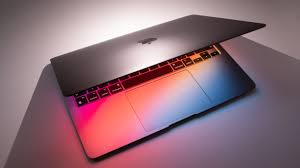
Best MacBook in 2026 – Complete Buying Guide
Choosing the best MacBook today isn’t just about picking the most expensive model. Apple’s laptop lineup has matured beautifully, and thanks to Apple Silicon, even entry-level MacBooks now deliver performance that once required high-end machines. Whether you’re a student, a remote worker, a creative professional, or someone who just wants a reliable laptop that “just works,” there’s a MacBook for you.
Let’s break it all down in plain English—no tech jargon overload, no marketing fluff, just real-world guidance.
Why Choosing the Right MacBook Matters
Buying a MacBook is like choosing a long-term partner. You’ll spend years together, so getting the right one upfront saves money, frustration, and regret.
Apple Silicon Changed Everything
Apple’s M-series chips turned the laptop world upside down. These processors combine power efficiency and performance in a way Intel-based Macs never could. Translation? Faster speeds, longer battery life, and quieter laptops.
macOS Ecosystem Advantage
If you already use an iPhone, iPad, or Apple Watch, a MacBook fits into your life like the final puzzle piece. Features like AirDrop, iMessage, FaceTime, and Universal Clipboard feel almost magical once you start using them.
Quick Comparison of the Best MacBook Models
Before diving deep, here’s the big picture.
MacBook Air vs MacBook Pro
The MacBook Air is lightweight, fanless, and perfect for most users. The MacBook Pro is heavier, more powerful, and built for demanding workloads.
Performance Differences
- MacBook Air: Excellent for daily tasks, light editing, and multitasking
- MacBook Pro: Designed for developers, video editors, and 3D artists
Price and Value Comparison
- MacBook Air offers the best value
- MacBook Pro offers maximum performance per dollar for professionals
Best MacBook Overall
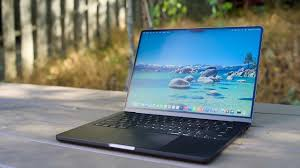
MacBook Air (M3) Overview
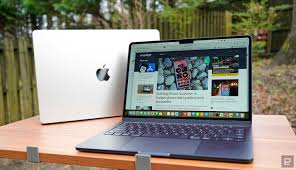
The MacBook Air with M3 chip is the sweet spot in Apple’s lineup. It’s thin, fast, silent, and powerful enough for 90% of users.
Key Specs and Features
- M3 chip with improved GPU
- Up to 18 hours of battery life
- Lightweight aluminum design
- Liquid Retina display
- Fanless operation (completely silent)
Who Should Buy It
Students, office workers, freelancers, bloggers, and casual creatives. If you’re wondering, “Is this enough for me?”—the answer is probably yes.
Best MacBook for Professionals
MacBook Pro 14-inch (M3 Pro / M3 Max)
This model is a powerhouse in a compact body.
Performance for Heavy Workloads
From compiling code to editing 4K videos, the MacBook Pro 14-inch handles intense tasks without breaking a sweat.
Display and Ports Advantage
- Liquid Retina XDR display
- More ports than the Air
- Better external display support
Best MacBook for Creatives
MacBook Pro 16-inch
If your work earns you money, this machine pays for itself.
Video Editing and Design Performance
The large screen, powerful GPU, and thermal headroom make it perfect for Final Cut Pro, Adobe Premiere, Blender, and Photoshop.
Best MacBook for Students
MacBook Air Value Proposition
Affordable, portable, and insanely reliable.
Battery Life for All-Day Classes
You can attend classes, take notes, browse, stream, and still have battery left when you get home.
Best Budget MacBook
Older MacBook Air Models
Older M1 and M2 MacBook Air models are still excellent.
Are They Still Worth Buying?
Absolutely, especially if discounted. Performance is still miles ahead of most Windows laptops in the same price range.
Performance Breakdown
CPU and GPU Power
Apple Silicon delivers smooth multitasking without fans screaming like jet engines.
Unified Memory Explained
RAM is shared across the system, making even 8GB feel more powerful than traditional laptops.
Battery Life Comparison
Real-World Usage Results
MacBook Air easily lasts a full workday. MacBook Pro goes even longer depending on usage.
Display Quality Explained
Liquid Retina vs Liquid Retina XDR
Both are excellent, but XDR is brighter, sharper, and ideal for professionals.
Brightness and Color Accuracy
Perfect for content creation, streaming, and everyday work.
Keyboard, Trackpad, and Build Quality
Why Apple Still Leads Here
The keyboard feels great, the trackpad is unmatched, and the aluminum body feels premium.
macOS Experience on MacBook
Productivity Features
Stage Manager, Spotlight, and Mission Control make multitasking effortless.
Software Optimization
Apps run faster and smoother because they’re built specifically for Apple hardware.
Ports, Connectivity, and Accessories
Thunderbolt, MagSafe, and HDMI
MacBook Pro wins here with more flexibility.
External Display Support
Professionals will appreciate better multi-monitor support.
Storage and RAM – What Should You Choose?
Recommended Configurations
- 16GB RAM for longevity
- 512GB storage minimum for professionals
MacBook Pricing and Value for Money
Which Model Gives the Best ROI?
MacBook Air offers the best balance of price and performance.
How to Choose the Best MacBook for You
Use Case Scenarios
- Student → MacBook Air
- Freelancer → MacBook Air or Pro 14
- Video Editor → MacBook Pro 16
Pros and Cons of Buying a MacBook
Advantages
- Long battery life
- Excellent performance
- Premium build quality
Disadvantages
- Expensive upgrades
- Limited gaming support
Best MacBook in 2026 – Extended Buying Guide
Apple has been redefining laptops for decades, and 2026 is no different. The best MacBook today isn’t just a high-powered machine; it’s a seamless experience, blending performance, portability, and ecosystem benefits. Whether you are a student, professional, or creator, choosing the right MacBook is crucial to maximize productivity and enjoyment. Let’s dive deeper and expand on the key aspects, comparisons, and real-world usage tips to help you make an informed decision.
Why Apple MacBooks Stand Out in 2026
Apple has spent years perfecting the MacBook formula. Unlike Windows laptops, MacBooks come with tight integration between hardware and software, which translates to smooth performance, consistent updates, and less troubleshooting.
Apple Silicon: The Game Changer
The M-series chips (M3, M3 Pro, M3 Max) are not just upgrades—they are complete reinventions of what a laptop can do. These chips combine CPU, GPU, and neural engines in a single system-on-chip (SoC). This means faster processing, longer battery life, and lower heat generation compared to traditional Intel laptops.
- CPU Performance: Handles complex tasks like video rendering, coding, and simulations efficiently.
- GPU Power: Great for graphics-heavy apps like Final Cut Pro, Adobe Photoshop, and Blender.
- Neural Engine: Accelerates AI-based tasks like machine learning and photo enhancements.
macOS: Productivity Made Effortless
macOS Monterey and later versions are designed for efficiency. Features like Universal Control, AirDrop, Handoff, and Sidecar make the MacBook experience unique. If you already own other Apple devices, the synergy is unmatched.
Detailed Comparison of MacBook Models
Apple currently offers a range of laptops, from MacBook Air M3 to MacBook Pro 16-inch M3 Max. Choosing the right model depends on performance needs, portability, and budget.
MacBook Air vs MacBook Pro
| Feature | MacBook Air (M3) | MacBook Pro 14/16 (M3 Pro/Max) |
|---|---|---|
| Weight | 2.7 lbs | 3.5 – 4.7 lbs |
| Battery Life | Up to 18 hours | Up to 22 hours |
| Performance | Light to moderate tasks | Heavy workloads, creative apps |
| Display | 13.6” Liquid Retina | 14”–16” Liquid Retina XDR |
| Ports | 2x Thunderbolt 4 | Multiple Thunderbolt, HDMI, SD |
Why This Matters
MacBook Air is perfect for most users. The Pro models shine for video editors, designers, developers, or anyone running multiple heavy apps simultaneously.
MacBook Air (M3) – The Best All-Rounder
The MacBook Air M3 is a powerhouse disguised in an ultra-slim body.
Key Features
- M3 chip: Efficient, quiet, and fast.
- Fanless design: Silent operation even under moderate load.
- Battery life: Lasts 18+ hours with regular usage.
- Display: Bright, colorful 13.6” Liquid Retina display.
- Portability: Light enough to carry everywhere.
Real-World Usage
- Students can write, research, and stream for a full day without charging.
- Professionals can run Excel, PowerPoint, and browsers without slowdown.
- Casual creatives can do photo editing or light video editing.
MacBook Pro 14-inch (M3 Pro / M3 Max) – For Professionals
This is a compact yet ultra-powerful machine.
Performance Highlights
- Handles 4K video editing smoothly.
- Ideal for software developers running multiple VMs.
- Can render 3D models faster than most laptops in the market.
Display & Connectivity
- 14” Liquid Retina XDR with 120Hz ProMotion.
- Supports external monitors seamlessly.
- Multiple ports: MagSafe, HDMI, and SD card reader.
Who Should Buy It?
If your work involves heavy software or you need a compact powerhouse for travel, the 14-inch Pro is perfect.
MacBook Pro 16-inch – The Ultimate Creative Machine
For content creators and high-end professionals, the 16-inch MacBook Pro M3 Max is unmatched.
- GPU Power: Handles 8K video editing without lag.
- Screen Size: Large 16-inch Liquid Retina XDR display for precise color grading.
- Battery Life: Can last up to 21 hours under typical workloads.
- Storage Options: Up to 8TB SSD for massive projects.
Ideal For
- Video editors
- Graphic designers
- 3D modelers and animators
Choosing a MacBook for Students
Students need laptops that are affordable, lightweight, and reliable.
Why MacBook Air Fits the Bill
- Long battery life for full-day classes.
- Lightweight for commuting or library work.
- Enough power for research, coding, and light creative projects.
Budget-Friendly MacBooks
Even if your budget is tight, Apple offers older M1 and M2 MacBook Air models.
Pros of Older Models
- Still fast enough for everyday tasks.
- Affordable with discounts.
- Long-lasting battery and good build quality.
Cons
- Less screen brightness than M3 models.
- Older ports and slightly lower GPU performance.
Performance Breakdown
Apple MacBooks excel in performance due to unified architecture.
Unified Memory Advantage
- RAM is shared across CPU and GPU.
- Even 8GB RAM feels faster than 16GB in traditional PCs.
CPU & GPU Efficiency
- MacBooks handle multitasking effortlessly.
- Video rendering, app compilation, and multitasking run smoother.
Battery Life – Realistic Expectations
- MacBook Air M3: 18 hours of web browsing.
- MacBook Pro 14-inch: 17–20 hours.
- MacBook Pro 16-inch: 20–22 hours.
This is significantly higher than most Windows laptops.
Display Quality Explained
Liquid Retina vs Liquid Retina XDR
- Air: Bright, vivid colors, great for daily use.
- Pro XDR: Extreme brightness, HDR support, ideal for creative professionals.
Color Accuracy
Professional photographers and editors will appreciate the Pro XDR display’s near-perfect color accuracy.
Keyboard, Trackpad, and Build
Apple continues to lead:
- Keyboard: Comfortable typing, low noise.
- Trackpad: Smooth, precise, unmatched in accuracy.
- Build Quality: Aluminum chassis, durable and premium.
Ports, Connectivity, and Expansion
Why It Matters
Professionals need multiple ports for:
- External monitors
- SD cards for cameras
- Fast data transfer via Thunderbolt
MacBook Pro models excel here, while MacBook Air is more minimalistic.
Storage & RAM Recommendations
- Students: 256–512GB SSD, 8–16GB RAM
- Professionals: 1TB SSD, 16–32GB RAM
- Creatives: 2TB+ SSD, 32–64GB RAM
macOS Features That Boost Productivity
- Stage Manager: Organize apps with ease.
- Spotlight: Find files instantly.
- Universal Control: Seamlessly use iPad as second display.
These features make working across devices intuitive.
Price & Value Comparison
| Model | Price Range | Value |
|---|---|---|
| MacBook Air M3 | $1,199–$1,499 | Excellent |
| MacBook Pro 14-inch M3 Pro | $1,999–$2,499 | Great for pros |
| MacBook Pro 16-inch M3 Max | $2,499–$3,499 | Best for creatives |
MacBook Air delivers the most bang for your buck. Pro models are expensive but worth it for specialized tasks.
How to Choose the Right MacBook
- Identify Your Use Case
- Student → MacBook Air
- Casual Creative → MacBook Air or Pro 14
- Professional Editor/Designer → MacBook Pro 16
- Consider Portability
- Frequent traveler → Air or 14-inch Pro
- Stationary setup → 16-inch Pro
- Future Proofing
- Higher RAM and storage for longevity
Final Verdict
Which MacBook Should You Buy in 2026?
If you want one laptop that does almost everything perfectly, buy the MacBook Air (M3). If your work demands more power, step up to the MacBook Pro.
Conclusion
The best MacBook isn’t about specs—it’s about how it fits your life. Apple has refined its laptops to the point where even the base models feel premium. Whether you’re typing essays, editing videos, or running a business, there’s a MacBook that feels like it was made just for you.
You may also like it: Best Android Tablets in 2026
1. Is MacBook Air powerful enough in 2026?
Yes, for most users it’s more than enough.
2. Which MacBook is best for video editing?
MacBook Pro 14-inch or 16-inch.
3. How long do MacBooks last?
Typically 5–7 years with proper care.
4. Is upgrading RAM worth it?
Yes, especially for long-term use.
5. Should I buy an older MacBook?
Yes, if it’s an Apple Silicon model and discounted.
6. Which MacBook is ideal for 4K video editing?
MacBook Pro 14-inch or 16-inch with M3 Pro/Max chips.
7. Are older M1 or M2 MacBooks still worth buying?
Yes, they are still powerful and more affordable.


One Comment on “Best MacBook in 2026: Top Apple Laptops Compared for Every Type of User”