Lenovo Smart Paper Review: Premium E-Ink Tablet or Too Pricey?
If you’ve ever wondered whether the classic feel of pen on paper can be fused with digital convenience, then the Lenovo Smart Paper makes a bold attempt — but with a twist. This 10.3-inch E-Ink tablet offers a slick physical writing experience and sharp hardware, yet many users feel its high price and limited software hold it back. Let’s dive in.
Introduction to Lenovo Smart Paper
Lenovo’s Smart Paper enters the e-ink tablet market as a digital notebook designed for note-taking, sketching, and light reading. It sits above budget e-readers but below full-featured tablets in terms of versatility. Available in the UK and other regions, it hasn’t widely launched in the U.S., and its retail presence is somewhat unpredictable.
What Makes E-Ink Tablets Special?
The Rise of Digital Notebooks
While Kindle and other e-readers made reading books digitally mainstream, devices like the Smart Paper aim to replace paper notebooks entirely – letting you write, save, and organize notes without needing physical sheets.
E-Ink vs Traditional Tablets
E-Ink screens mimic ink on paper, reducing eye strain and extending battery life. But unlike traditional tablets, they don’t shine with vibrant colors or fast motion graphics, making them ideal for reading and writing but less so for video or apps.
Hardware Overview
Design and Build Quality
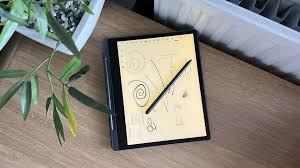
The Smart Paper carries a clean, minimalist design. A subtle indent on the left houses the stylus magnetically — a clever storage feature. Its metal frame feels sturdy and premium, but its display, at 227 ppi, seems slightly less crisp compared to rivals like Amazon’s Kindle Scribe.
Display Features
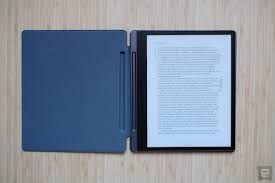
The 10.3-inch E-Ink screen is matte and easy to read in most lighting conditions, and unlike some competitors, it includes a built-in front light for darker environments. However, the lower pixel density makes text and images look a bit softer.
Stylus and Included Accessories
Lenovo bundles a stylus and folio case – a perk compared to competitors that often charge extra. The stylus supports tilt and pressure sensitivity with 4,096 levels, enhancing the natural feel of writing.
Writing and Drawing Experience
Stylus Performance
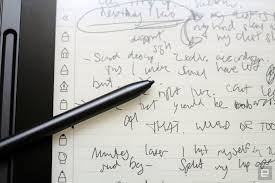
Most users praise the stylus feel: smooth, responsive, and comfortable in hand. Its latency is low enough that it doesn’t interrupt writing flow, making journal-like writing or sketching pleasant.
Latency and Pressure Sensitivity
With decent pressure sensitivity and a matte screen texture, the Smart Paper feels closer to pencil on paper than most digital styluses – though still not as fluid as top-tier tablets.
Software Experience
Customized Android Interface
Running a modified Android 11, the Smart Paper doesn’t deliver a full tablet experience. Instead, Lenovo’s custom interface focuses on core writing functions, though it feels limited and sometimes temperamental, especially when navigating between pages.
Notes and Templates
The device includes a variety of templates – from basic lined pages to more complex layouts — but many feel repetitive and not very flexible.
Reading and File Support
You can view EPUB, PDF, and Office formats, and there’s an eBooks.com app for book purchases. Yet the experience is far from seamless, with some text rendering quirks on the E-Ink screen.
Cloud Sync and Subscription Issues
Lenovo Smart Paper App and Costs
To sync notes across devices, Lenovo’s Smart Paper app offers cloud storage — but it’s pricey and limited compared to services like Google Drive. Subscriptions start at roughly £9 per month with a small storage cap, making users question long-term value.
Integration with Google Drive
Google Drive support exists but doesn’t fully unlock all note features, especially syncing notebooks themselves — another frustration for users seeking seamless workflows.
Real-World Usage: Daily Notes and Syncing
While offline handwriting recognition is useful, converting extensive handwritten notes to transferable digital text still requires extra steps or cloud sync, limiting convenience for heavy note-takers.
Pros of Lenovo Smart Paper
- Premium design and build quality
- Included stylus and folio
- Natural writing feel
- Built-in front light
- Support for common document formats
Cons of Lenovo Smart Paper
- High price for limited features
- Subpar software flexibility
- Costly cloud subscription
- Limited app ecosystem
- Less crisp display than rivals
How It Compares to Competitors
ReMarkable 2
The ReMarkable 2 often costs less and delivers a strong note-taking focus without costly cloud fees, making it a stronger choice for many users.
Kindle Scribe
Amazon’s Kindle Scribe may offer a higher-resolution screen and better ebook ecosystem, though it still has its own limitations.
Who Should Buy This Tablet?
The Lenovo Smart Paper suits users who prioritize handwriting feel and build quality above all else — provided they’re not deterred by price or software limitations.
Performance and Responsiveness in Everyday Use
When it comes to daily performance, the Lenovo Smart Paper behaves like a calm, focused assistant rather than a hyperactive multitasker. Page turns are generally smooth, and writing input feels responsive, but you’ll occasionally notice slight delays when switching tools or opening larger documents. This isn’t a deal-breaker, but it reminds you that E-Ink technology prioritizes clarity and battery life over speed. Think of it like driving a luxury sedan instead of a sports car — smooth and comfortable, just not built for racing.
Battery Life: One of Its Strongest Advantages
Battery life is where the Lenovo Smart Paper truly shines. Thanks to its E-Ink display, the device can easily last weeks on a single charge with moderate use. Writing notes for a couple of hours each day barely dents the battery percentage. Even with the front light enabled, power consumption remains impressively low. For students, professionals, or researchers who hate carrying chargers, this long battery endurance feels liberating.
Handwriting Recognition and Text Conversion
The handwriting recognition feature works reliably for clean, structured writing. Converting handwritten notes into digital text is fairly accurate, especially for English, though messy handwriting can confuse it. While the conversion process isn’t instant and sometimes requires cloud syncing, it’s still a valuable feature for turning brainstorming sessions into editable documents. It won’t replace typing altogether, but it bridges the gap between analog creativity and digital organization.
Multilingual Support and Limitations
Lenovo advertises multilingual handwriting support, and while it does recognize several languages, accuracy varies. English performs the best, while other languages may require clearer, more deliberate writing. This makes the Smart Paper better suited for users who primarily work in English. If multilingual support is central to your workflow, this limitation could feel restrictive over time.
Privacy and Offline Functionality
One underrated advantage of the Lenovo Smart Paper is its ability to function offline. You can write, sketch, and organize notes without being constantly connected to the internet. This not only improves privacy but also reduces distractions. In a world obsessed with notifications, the Smart Paper feels like a digital detox tool disguised as a notebook.
Learning Curve and User Friendliness
The interface is relatively easy to understand, even for users new to E-Ink tablets. That said, some menus feel unintuitive, and advanced features are buried too deeply. Once you get used to it, navigation becomes second nature – but the first few days may involve a bit of trial and error.
Use Cases: Where the Smart Paper Excels
The Lenovo Smart Paper works best for:
- Students taking handwritten lecture notes
- Writers drafting ideas and outlines
- Professionals in meetings who prefer handwriting
- Artists doing light sketching and concept work
It’s less ideal for users who want heavy annotation, complex PDF workflows, or a rich app ecosystem.
Is the Price Justified in the Long Run?
This is the biggest question. While the hardware quality and writing experience justify part of the cost, the subscription-based cloud syncing and limited software flexibility make the price harder to swallow. Over time, the total cost of ownership increases, especially when competitors offer similar experiences with fewer ongoing fees.
Final Verdict Expansion: A Device with Identity Issues
The Lenovo Smart Paper feels like it’s caught between two worlds. It wants to be a premium digital notebook, yet it borrows too little from full-fledged tablets and charges too much for a minimalist experience. It’s not a bad device – in fact, it’s quite good — but it struggles to justify why it should be chosen over better-balanced competitors clearly.
In short, the Lenovo Smart Paper is a beautifully crafted tool for focused thinkers, but its price and software decisions stop it from becoming the obvious choice.
Conclusion
The Lenovo Smart Paper impresses with its solid hardware and excellent writing experience. But expensive pricing, limited software, and frustrating cloud integration dilute its allure. For many buyers, alternatives like the Remarkable 2 or Kindle Scribe offer stronger value – unless you fall head-over-heels for Lenovo’s unique design and writing feel.
May you also like it: Best Desktop Computers in 2026
1. Is Lenovo Smart Paper worth the price?
For casual note-taking, maybe not – competing devices often offer better value.
2. Does it support third-party apps?
It runs Android but only supports a limited number of apps without side loading.
3. Is cloud sync necessary?
Cloud sync isn’t mandatory, but useful – though costly.
4. How long does the battery last?
E-Ink tablets typically last weeks on a single charge, though usage varies.
5. Can it replace a paper notebook?
Yes — its writing feel makes it a strong paper replacement, but software limits may frustrate heavy users.


Hmm it appears like your ssite ate my first comment (it was super long) so I gueess I’ll just sum itt up what I wrote and say, I’m thoroughly enjoying your blog.
I too am an aspiring blo writer but I’m still new to
everything. Do you have any recommendations for rookie
blog writers? I’d grnuinely appreciate it.